One password to rule them all?
Rédigé par Romain Pialat
-
25 August 2026The release of the FantomApp application, which helps teenagers (and adults too) better manage their online safety, is an opportunity to revisit passwords, their management, their properties, and the ‘Testing my password’ tool integrated into the app.
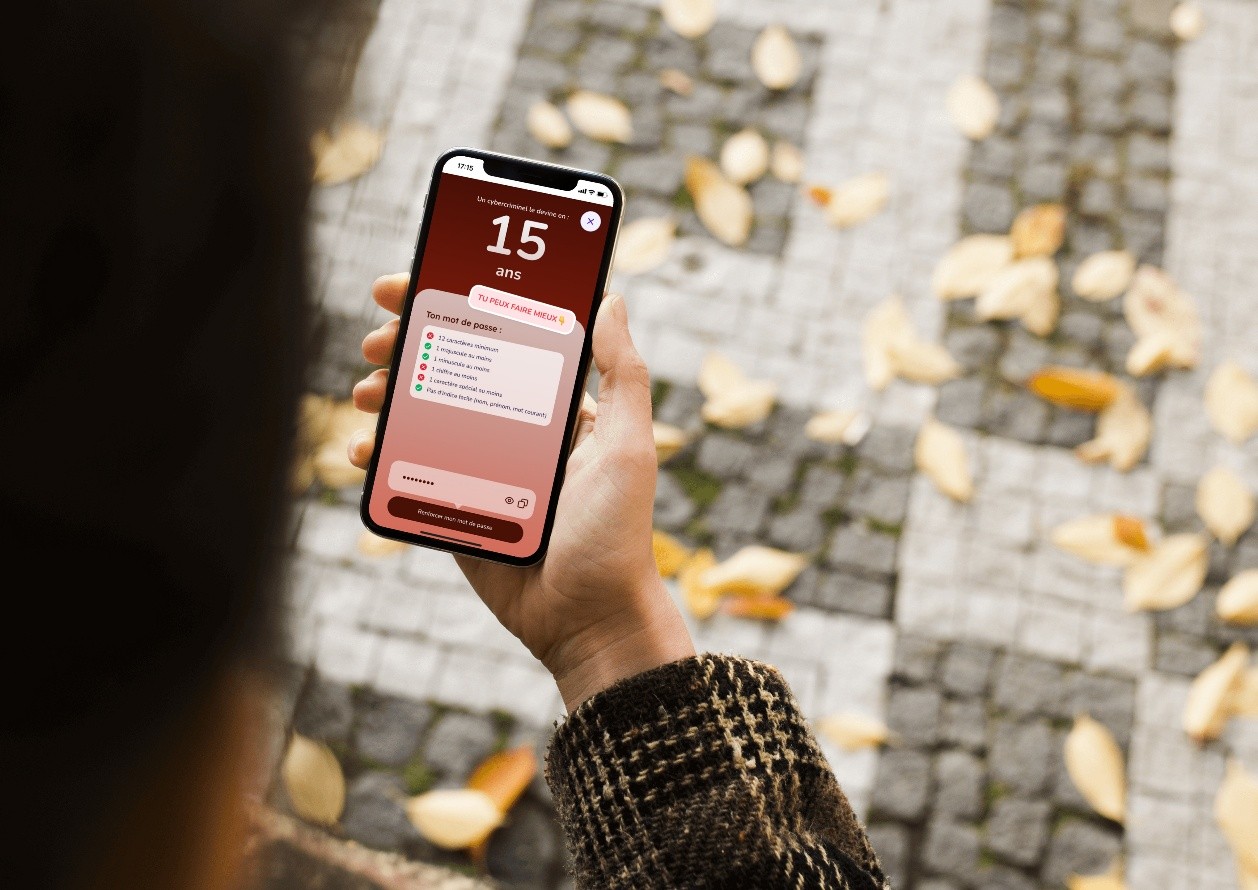
The FantomApp application includes a password checker. This feature can be confusing for those who do not understand how the suggested results are calculated. Let’s take a closer look at passwords, their creation, storage, and how the checker performs its calculations.
«Yes, it’s me, FantomApp»
On December 16, 2025, the FantomApp application was released, developed by the CNIL as part of a project funded by the European Union. FantomApp aims to equip and support middle school students. As explained in articles covering surveys conducted among young people, teenagers have already adopted cybersecurity practices related to their online activities. Whether it is being cautious about certain social networks, posting temporary “stories” rather than photos that would remain indefinitely, or being aware of the consequences of strong online exposure, there is no shortage of examples of strategies used by middle school students.
FantomApp is not intended to impose strict rules that may not be suited to this audience, but rather to support them by providing responsible tools in the field of cybersecurity.
To achieve this, FantomApp provides several modules :
- “I have a problem online”: a space dedicated to resources that can be used in potentially problematic online situations, whether it involves content removal, hacking, or even sextortion. The different tabs allow users to access the necessary help with a single click.
- “Tools”: this section offers three tools to check and improve online security, namely a password checker (see below), a photo-blurring tool, and a questionnaire about personal information included in usernames/bios on social media profiles. All of these operate locally, with no data being sent to servers. Users can therefore test their passwords and blur their photos with complete confidentiality.
- “Stay Safe”: this module lists some of the most widely used social networks and guides users through their settings using screenshots, in order to improve their online privacy. Checklists are provided based on available options (location, security, visibility, good practices).
«The ideal password is simple: it has all the flaws.»
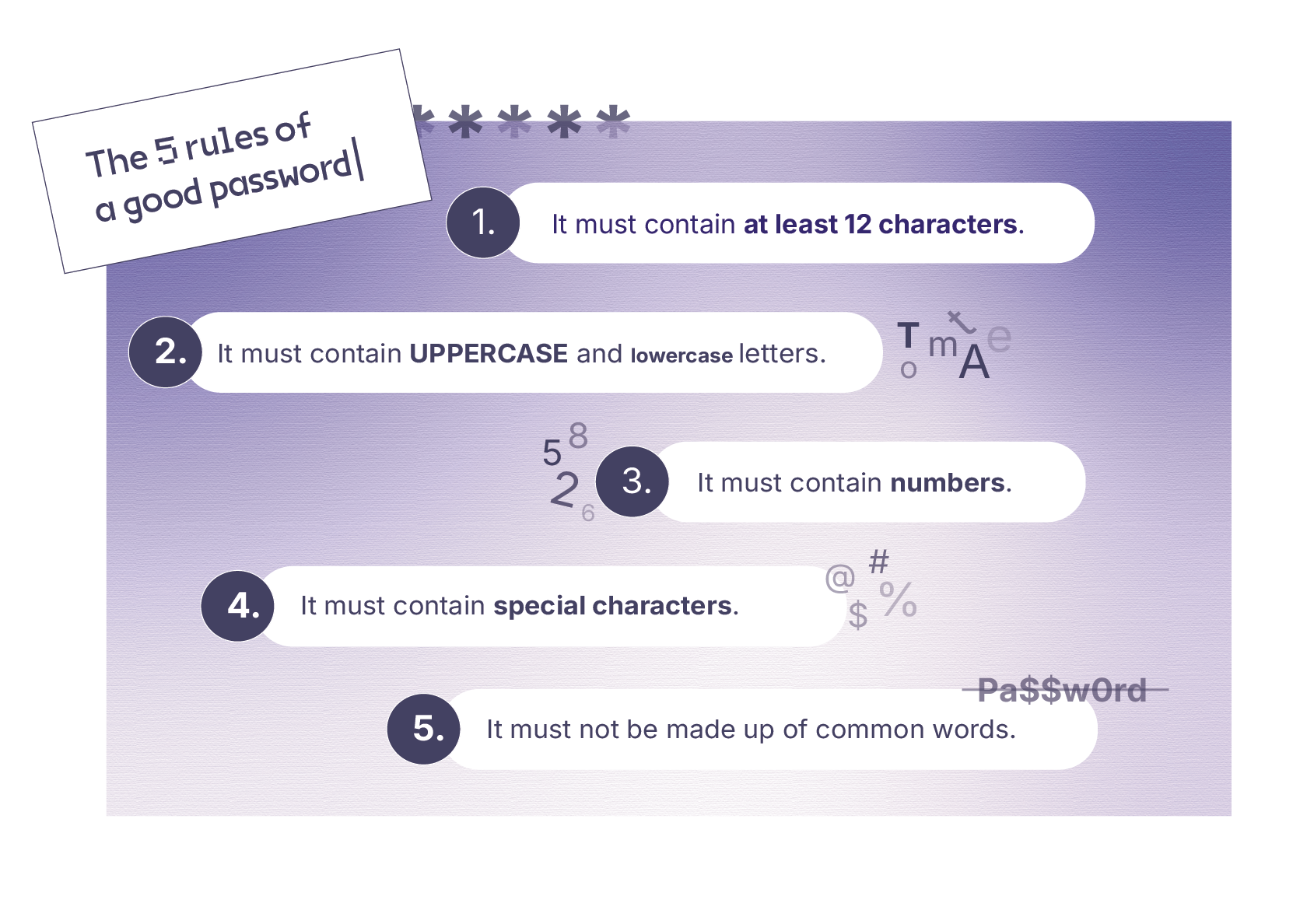
Having a strong password is essential, but what does that actually entail? Often, it is recommended to follow constraints such as:
- 1 number;
- 1 uppercase letter;
- 1 special character;
- At least 8, 10, or 12 caractères (the CNIL recommends twelve).
Most websites or social networks where we create accounts force us to comply with these rules, which can sometimes give a false sense of security, without addressing the optimal combination of these factors. As noted in the article “De ‘azerty’ à ‘pa$$word’ une revue des pratiques de gestion des mots de passe ”, the password “Motdepasse123!” which meets the criteria listed above is not actually that secure. The same goes for the well known « Pa$$w0rd »: which tops lists of passwords to avoid.
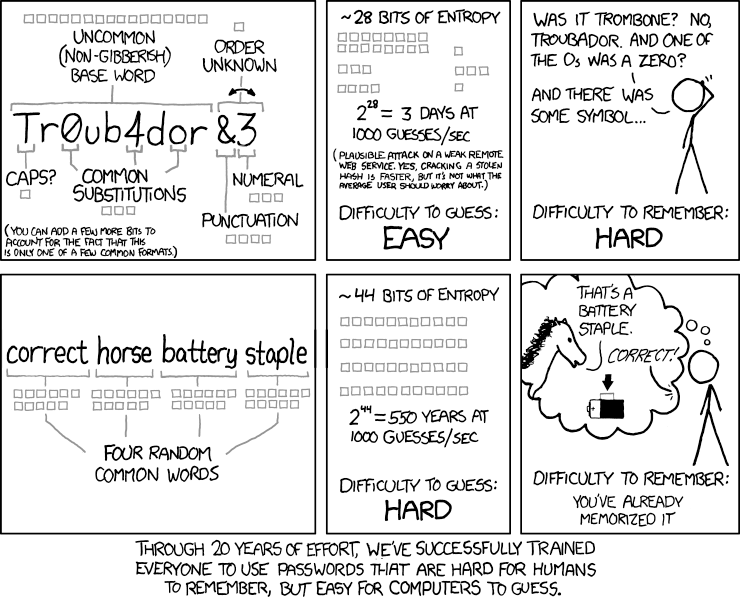
To determine the strength of a password, it is possible to use the concept of entropy, adapted to this specific context. Here, it is an objective and easy-to-calculate measure that corresponds to all the possible combinations a password can take. It serves as an upper limit for estimating the time required to “crack” your password.
The concept of entropy applied to a password (a term used by Claude Shannon, borrowed from physics) represents the size of the set of words (sequences of characters) from which your password could have been chosen—that is, the set of all possibilities. If your password consists only of lowercase letters from the Latin alphabet, there are 26 possibilities for each character. If it contains 12 letters, then the total number of possible character sequences for your password is 26¹² (hundreds of trillions of words – good, but not enough, as we will see next).
Obviously, if you also use numbers, you need to add 10 possible characters, which increases the total number of possibilities to 36¹². Similarly, uppercase letters, special characters, and so on further increase the size of the set of possible passwords.
Entropy is the number of bits (0s or 1s) that would be required to “encode” in binary each word in the set of possibilities. To calculate the exact entropy value corresponding to your password also called bits of entropy you need to compute the binary logarithm of the size of the set of possibilities:
Entropy = Log2(3612) ~ 62 bits
According to the Proton, website, which provides more details on entropy calculations, a secure password has over 75 bits of entropy.
Be careful: this entropy measure is imperfect because it assumes (often incorrectly for a human) that you choose your password completely at random. It’s as if every possible password (a sequence of 12 characters from the allowed set) were written on a small piece of paper in a big hat, and you drew one at random to select your password. In reality, it is difficult for us mere mortals to choose passwords that are “truly” random from all the possibilities. We are biased, tending to pick passwords that make sense to us and are easier to remember.
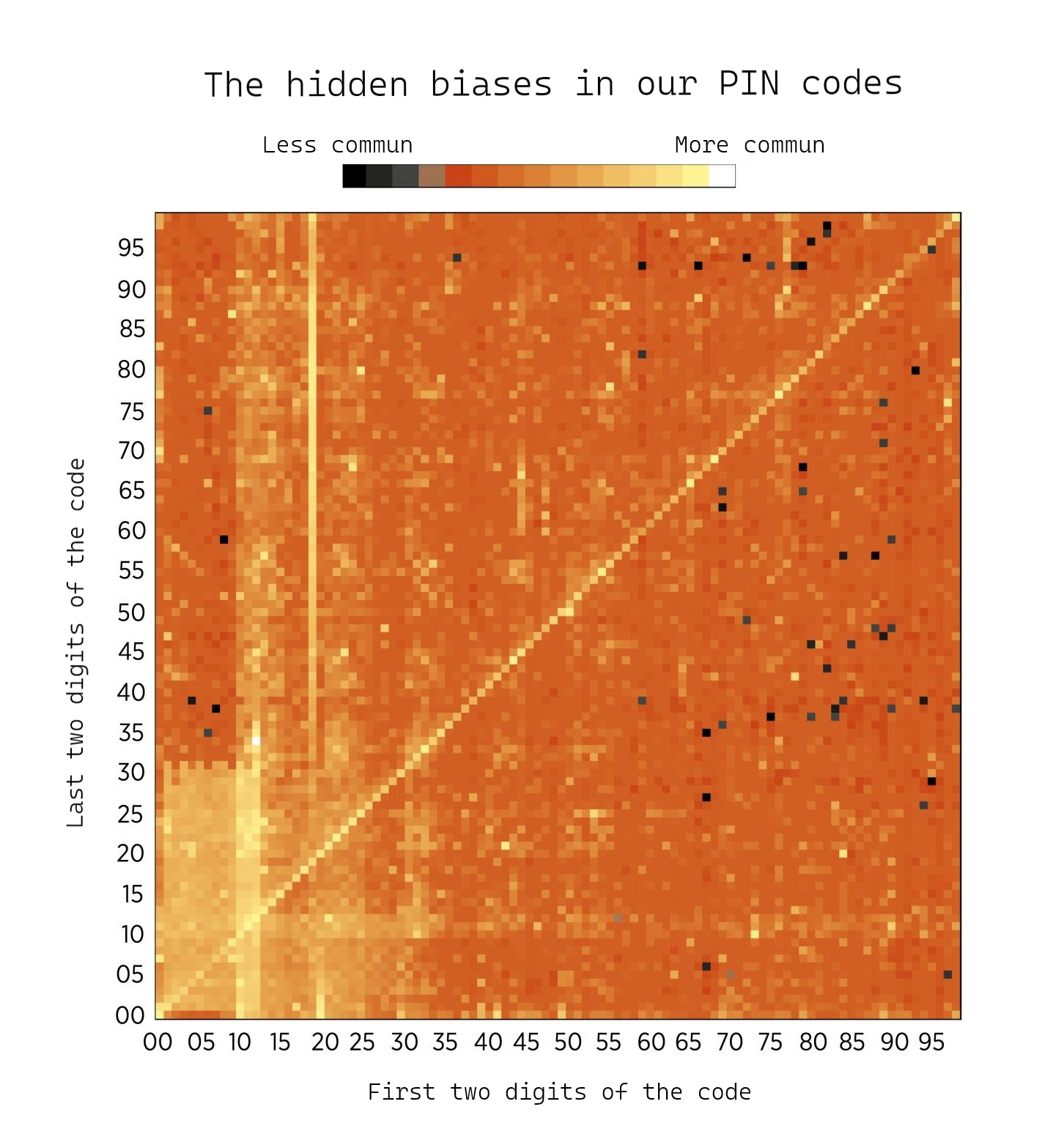
Here you can see the frequency of PIN code choices. It might be tempting to assume that the security of a PIN code depends solely on the size of the set of possibilities. Here, the space consists of 10 digits for 4 numbers, so 10⁴ = 10,000. However, this distribution clearly shows that most PIN codes fall within a rectangle in the bottom left, where the first two digits represent a month and the next two digits the day of that month—you guessed it, birth dates. The same goes for the large vertical strip above numbers starting with 19 for people born in the 20th century, or the diagonal of repeated digits. In short, the entropy of a PIN code is generally lower than one might expect.
The same applies when calculating the entropy of a password such as “Motdepasse123!”. In theory, this 14-character password has high entropy (over 75—try calculating it with the formula above). But if you truly chose a password at random from all 14-character possibilities, you would be just as likely to pick “Motdepasse123!” as “xB#3Tt!bYak$c2”. Strangely, humans tend to make the first choice.
So, talking about entropy without true randomness is somewhat a misuse of the term, but we will continue to do so in this article.
Finding a strong password
We can see, then, that finding a strong password is not just about achieving high entropy. There are other rules to follow, such as avoiding the use of your own name, your children’s names, or your pets’ names.
“Real” hackers, in fact, use precompiled password lists that allow them to try a large number of different combinations based on words familiar to users in their language. These lists can even include combinations of multiple words or mixes with numbers, substitutions like replacing “a” with “@”, and so on. Simply writing something like “Motdep@sse123!” is therefore not enough to stay secure.
Moreover, they (the sneaky ones) reuse password lists from data breaches, which may include information from an online game you stopped logging into long ago but… oops, you use the same password for your favorite social network? That’s why CNIL also recommends not using the same password across multiple sites.
For more information on how to create a strong password, the CNIL website offers a “passphrase” generator passwords that are easy to remember yet appear very complex, while still meeting the criteria required by websites.
Once your passphrase is created, you can test it in the FantomApp checker. If you don’t get a “super” rating, don’t hesitate to let us know!
Be careful with online password checkers: it is not recommended to test your passwords on just any site. Unless you can verify that no data is sent to their servers, you have no guarantee that your passwords aren’t being stolen. Such password lists can then be sold on hacker exchange platforms.
In the FantomApp application, since the source code is open, you can verify (or ask an expert to do so) that all data remains local on your phone.
The time is long, the dot is blue
In FantomApp, we decided to add a checkbox when creating a password: “contains my first name, last name, or easily guessable words.” While still calculating classic entropy, this checkbox allows the app to flag all cases where a hacker could guess your password or has used a pre-made password list. In such cases, the estimated time to crack it is always shown as “instant”.
A problem in the app?
Several comments have been made regarding certain results, notably for our favorite example, where the time displayed for “Motdepasse123!” (if you don’t check the box) is 19 trillion years.
As seen in the example, the number of entropy bits (theoretical, since this concept only works with a truly random choice of characters) for this password is over 75. But in reality, if your security relies on “Motdepasse123!”, there’s no point in calculating a cracking time you’re already compromised by the choice of words and numbers you used.
To convert these entropy bits into an estimated time, we use the matrix calculated by Hive System, a cybersecurity company that annually estimates how long it would take to crack a password based on its length and composition (uppercase letters, numbers, special characters, etc.). The matrix used for FantomApp is available on their website.
You can verify this for yourself: a 14-character password including uppercase and lowercase letters, numbers, and special characters shows “19 tn years” on the matrix, which translates to “19 trillion years.”
This matrix, republished on the FranceNum website, is used by many cybersecurity experts as a reference for estimating password strength.
Of course, there are limitations to this estimation, which Hive System outlines on its website:
- They assume that your password has not been part of a data breach that would allow it to be recovered in plain text;
- They assume that your password is generated randomly, meaning it cannot be guessed by a hacker and that the attacker would have to try all possible combinations—a kind of “worst-case scenario,” providing an upper limit on the time it would take an attacker to crack your password;
- They use a QWERTY keyboard, without the accents commonly used in French. This constraint reduces the possible entropy of your password ;
- Other limitations are mentioned on their website.
It should also be noted that this table is based on the bcrypt hashing algorithm with a work factor of 10. The next paragraph will explain what this means.
«Hash, salt, pepper: the little kitchen of computer security»
This title, which we borrowed from this blog post, introduces three interesting concepts in password management. Let’s start with hashing
Hashing is a cryptographic technique used, among other things, to store passwords in a database without saving the password itself. Hash functions are complex mathematical functions that transform any string of characters (text, program, password, etc.) into a fixed-length, unique sequence of characters in a deterministic and non-reversible way. This means that for the same input, the function will always produce the same output, and for a different input, it will produce a different output. The advantage of a well-designed hash function is that it is irreversible: from the hash of a message, you cannot reconstruct the original text. Additionally, although deterministic, hash functions also have the benefit of producing very different outputs even for two very similar inputs.
For example, a hash of “Motdepasse123!” is:
f77ec526c574835c048c417ca3786c350f08781d83217d0478b96f85ffb8fac4
And the hash of “Motdepasse123?” is:
74f4f4c50da00a13d3f7061be46d973a69f7c897e2478745e1111b32f33db80f
Nothing alike, except that both look like gibberish.
There are different hashing methods, each with its own purposes. In the example shown here, the hash function used is “SHA256,” but there are many others, such as “bcrypt,” mentioned earlier.
Why we’re talking about it?
When a hacker tries to find your password, they usually don’t attempt to log into your Facebook or Instagram account by testing passwords one by one. You typically get three attempts before being blocked, and you’ll receive an alert. That’s why hackers try to recover passwords from leaked databases—it’s much easier.
The database generally consists of:
- your email address;
- the hash of your password;
- the salt of your password (we’ll explain what this means later).
If the passwords were not hashed, the Hive System matrix would be meaningless, because everything would be “instantaneous” a hacker would just need to read the database.
It is therefore important to understand the mechanisms behind password storage and why it can take hackers time to crack them.
In many cases, passwords are stored in databases as hashes (although some sites still don’t use hashing functions, this is increasingly rare). A leaked database does not contain your passwords in plain text that is, readable form but rather your hashed passwords, which look like gibberish. When you log into a site, your password is first hashed and then compared to the hash stored in the database. Naturally, if you tried to enter the hash itself instead of your password to log in, it would be rejected.
However, this security measure is not without its flaws. Indeed, anyone can use a hashing function. As a result, there are lookup tables that match commonly used passwords with their corresponding hashes. These are known as Rainbow Tables. Hackers use them on lists of known passwords and can then compare the resulting hashes with those from a leaked database. This allows them to crack passwords very quickly
A bit of powdered sugar salt
To protect against lookup table attacks (Rainbow Tables), there are two concepts highlighted in the title of this section: salt and pepper. These friendly names illustrate that once added to your password hash, they cannot be removed—like spilling a pot of salt into your soup, it’s too late.
Simply put, a salt is a random string of characters added to the password before hashing, and it is stored alongside the password in the database. When a user logs into a site, this salt is added to their password, and the system checks that it matches the one originally stored.
Your table therefore looks like this:
username | hash(password + salt) | salt (wiki)
For example:
User1 | 7122b098b28aa1e1c944e3565a69a6c84d46a6c573f06938a19be0e5d915a923 | kOb#0o7mA(VbSruP
The hash shown here is the result of the SHA256 hashing function applied to the password « Motdepasse123? » combine with the salt « kOb#0o7mA(VbSruP ».
This provides several advantages:
- Two identical passwords have different hashes;
- Lookup tables (Rainbow Tables) no longer work, since they are based on precomputed hashes of known passwords without salt;
- An attacker can no longer test all the hashes in the database at once, they must add the specific user’s salt each time.
It is this third property that interests us.
Without the salt, when an attacker obtained a simply hashed database, they could either use lookup tables to compare against the database, or test every possible password by hashing each one and comparing it with the database. This would result in:
Hash(« a ») = hash_of_a, is hash_of_a in the database?
Hash(« b ») = hash_of_b, is hash_of_b in the database?
Hash(« ab ») = hash_of_ab, is hash_of_ab in the database?
And so on. A long process, but one that allows each attempt to be compared against the entire database. For a determined hacker, nothing is impossible.
Salt prevents this kind of comparison: the attacker must now choose a specific salt to target and hash all possible password combinations with that salt, ultimately cracking only a single password from the database. As a result, even if a hacker happened to generate your password while attacking another account, they wouldn’t know it.
This is why the estimated time in the tables provided by Hive System is so long. All that for this. But as they say, the journey matters more than the destination.
Hashing takes time
A password hashing function is considered strong for several reasons, one of them being its execution time. It must not be too long: waiting two minutes before being able to log in would be unacceptable but if it is too short, hashing a large number of passwords becomes too easy.
In the Hive System table, the choice is to use a common hashing function (the one most frequently found in databases leaked in recent years), with a “work factor” aligned with what is most commonly implemented. This work factor represents the time required to compute a hash: if it is too low, a hacker could reproduce hashes too quickly; if it is too high, hashing users’ passwords would take too long, creating noticeable delays for them.
In this case, the hashing function used is “bcrypt” with a work factor of “10.” This value is a minimum commonly used in various libraries.
And the pepper ?
In practice, pepper is a kind of secret salt—a string of characters added to all passwords in the database before hashing, but not stored in the database. The company keeps this pepper safely on its servers, making brute-force attacks impossible unless a hacker has already infiltrated their network.
For most major companies (Google, Meta, etc.), although it may not be explicitly mentioned—or even referred to as “pepper”—a similar security mechanism exists.
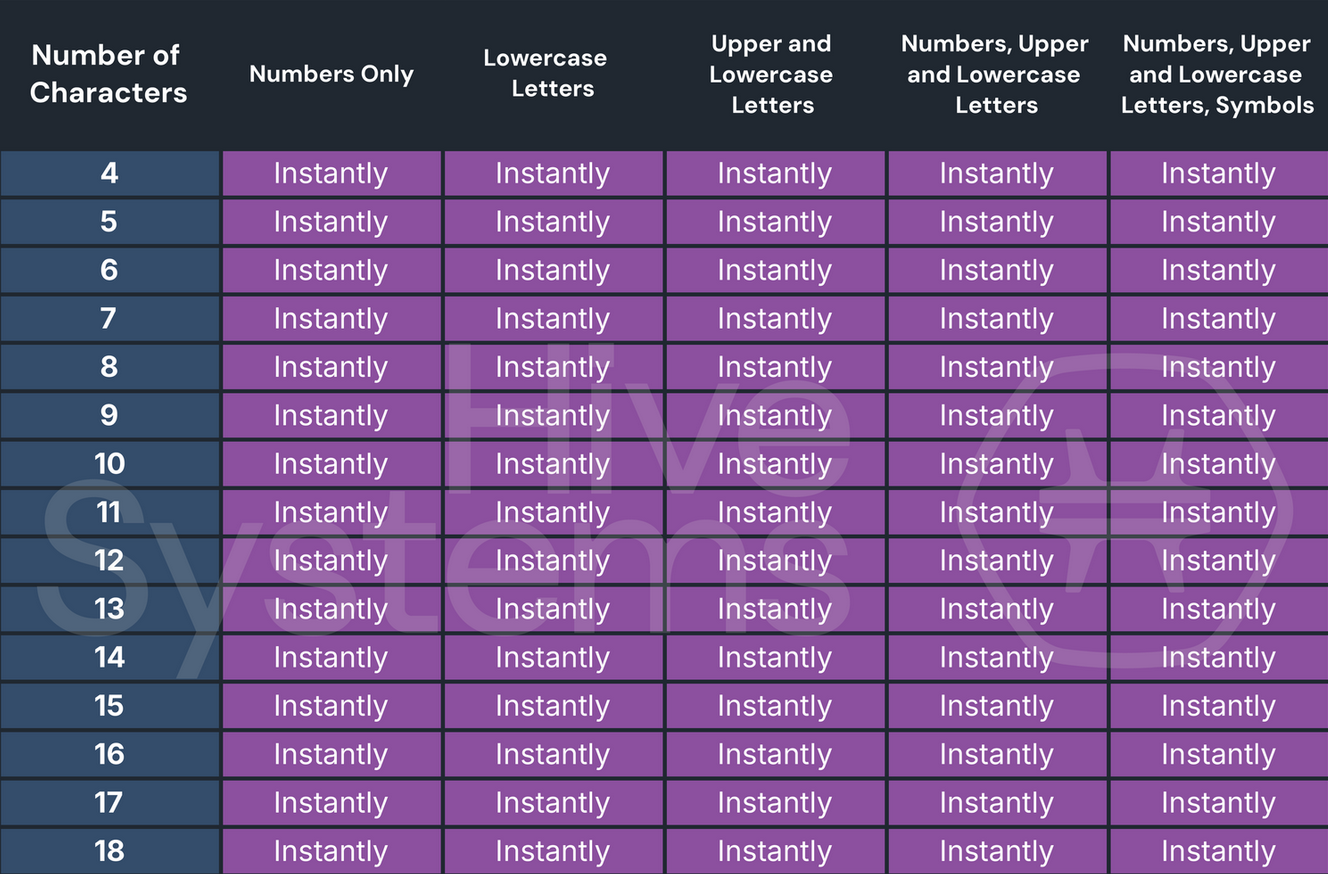
This protection is useless if you use the same password everywhere, including on less secure services that have no pepper, or worse, no salt at all. A password that has leaked once will obviously be reused by hackers, and as Hive System mentions, if your password has leaked, the cracking table becomes :
To learn more about the topic of pepper, feel free to check out the blog post mentioned earlier.
Why not include a password database in the app?
Some online password checkers offer to search leaked databases to see if your password appears there, or if it is similar to one in the database. This is a useful feature, but it relies on data that was obtained through leaks.
Beyond the technical challenges of integrating and keeping such a database up to date within an app, there would also be legal concerns, since using these databases could be considered handling stolen data.
In conclusion
The FantomApp application allows you to check whether your password has good entropy and provides a playful score estimating how long it would take a naive hacker to find it. This time is based on the assumption that your password is close to a random string of characters, meaning a hacker couldn’t guess it easily. Of course, the calculator will return the same time estimate for “Motdepasse123!” and “xB#3Tt!bYak$c2,” since both meet the same criteria (length, uppercase, lowercase, numbers, and special characters). Be careful with how you interpret the displayed time—it is only valid for passwords resembling the second type of string.
This checker runs locally on your phone or browser, and no data is ever sent out. You can therefore test your passwords safely, while also learning about best practices for creating strong passwords.
The reason we don’t mention password managers is related to the target audience of our app. While essential for good digital hygiene, password managers can seem complicated for children aged 10 to 15, and choosing a strong password is already an important first step. We also encourage users to enable two-factor authentication (see the tips in the “Stay Safe” section).
If you still want to learn more about these managers, you can check out the Wired article that reviews password managers built into browsers. While these managers are simple to use and very widespread, they are not without drawbacks. A first good practice is to secure access to your stored password database in the browser; otherwise, anyone can read all your secrets when your computer is left unlocked.
Finally, let’s recall a resource for generating a strong password: the CNIL password generator can help you come up with ideas for good passwords.
You can find more resources on how to create a strong password by downloading the following PDF. These are the educational sheets and tools we used during workshops in middle schools in Île-de-France to understand young people’s security needs.
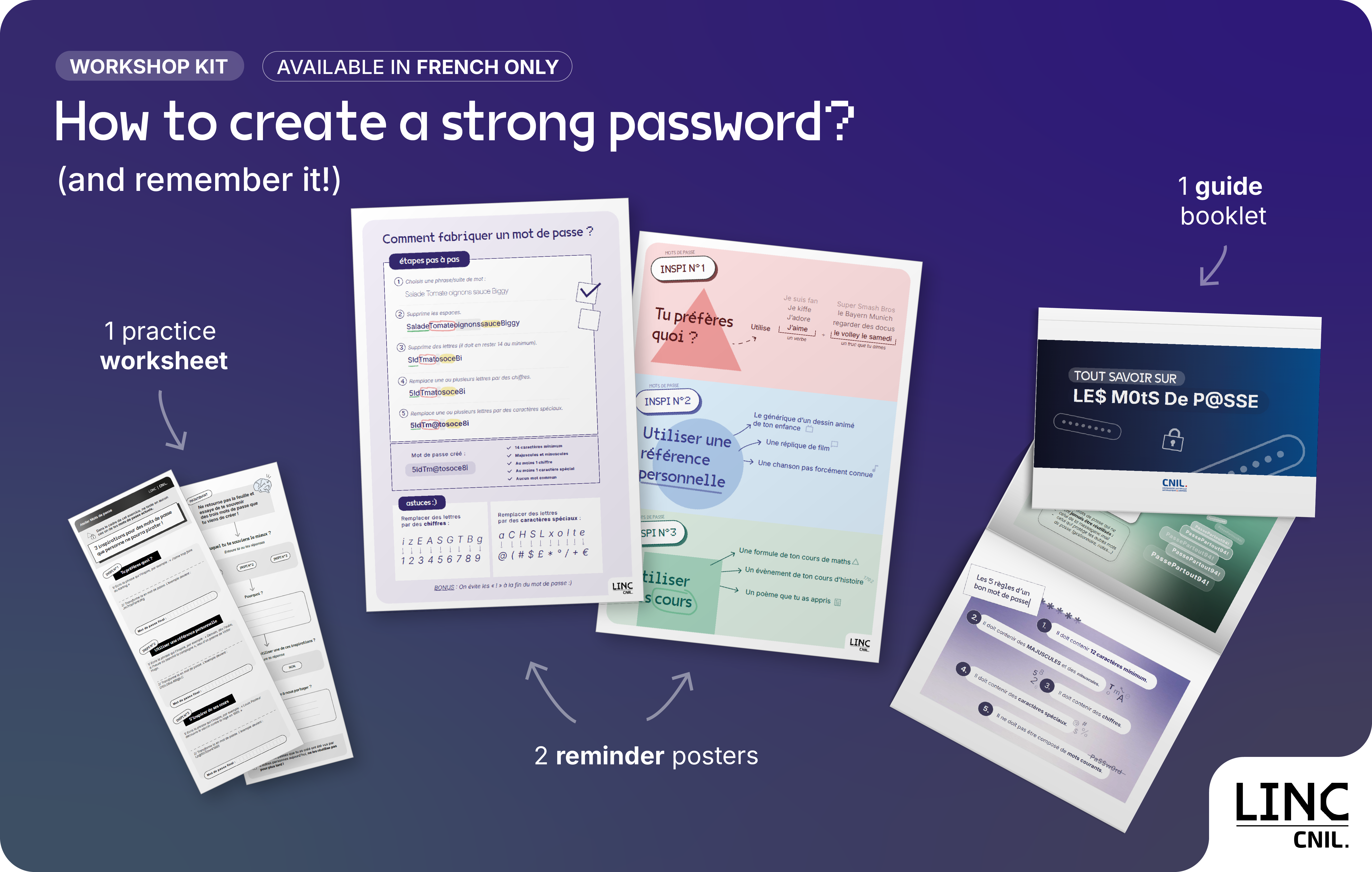
Download the PDF (only in french)
Illustration : LINC