Fingerprinting
Rédigé par Romain Darous
-
02 June 2026The term “fingerprinting” refers to a technique used to characterise a client sending a request to a server with a unique string. A fingerprint makes it possible to identify the machine originating a request and to infer certain information about its technical attributes: browser used, IP address, use or non-use of a VPN, etc. This technique is very useful for filtering a website’s web traffic and blocking bots that may connect to it for scraping purposes or to carry out attacks such as DDoS, for example.

This article will begin with a reminder of web communication protocols, before explaining what information can be used to identify the client accessing a website by analysing each layer of these protocols and their respective fingerprints.
Reminder on web communication protocols
A client (the user) and a server (the host of a website) communicate using standardised protocols organised into several layers: application (HTTP protocol), security (TLS protocol), and transport (TCP or QUIC protocols), among others. By examining HTTP request headers and the properties of the browser being used, it is possible to determine whether the user is a scraping bot, by computing “fingerprints” of the requests (a process known as fingerprinting) and comparing them with known fingerprints.
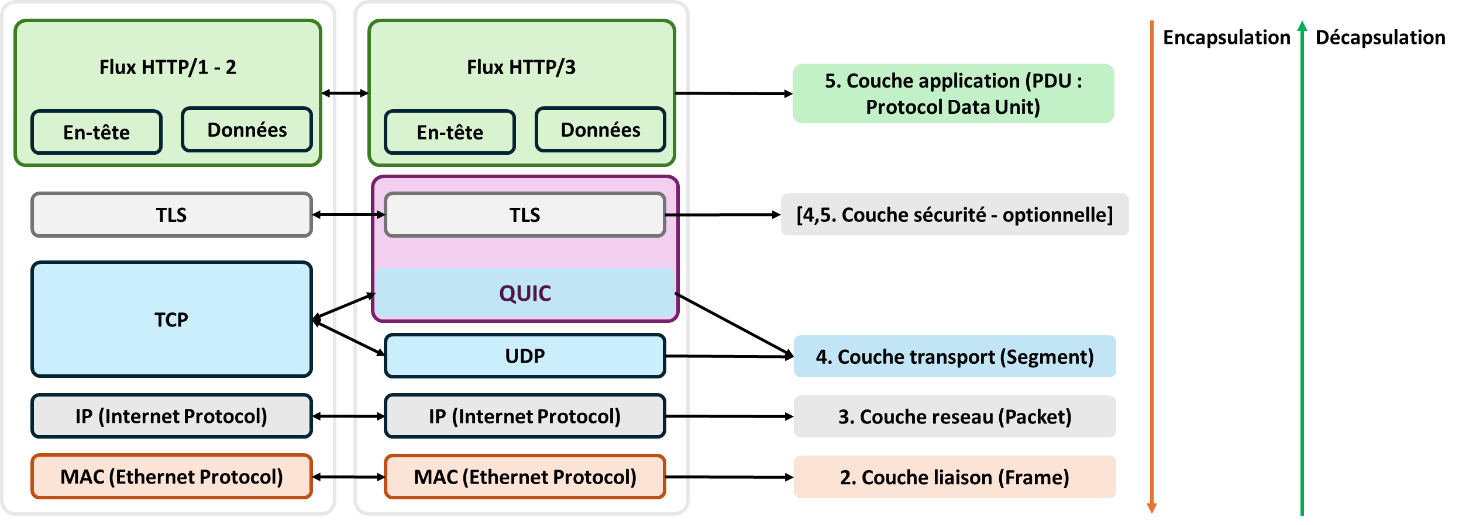
Reminder of the communication protocols used on the World Wide Web. Some websites use all three versions of the HTTP protocol, which is why it is important to study them.
Web communication protocols
When sending a request, a sender encapsulates its data progressively in accordance with the protocols of each layer. First, the sender’s data are divided into fixed-size units called Protocol Data Units (PDUs). At each layer, a header is added, specifying the protocol’s implementation details as well as addressing information that directs the request so that it reaches its destination. Thus, the PDU is encapsulated with information from the following layers:
- Application layer: the header contains the domain name to which the user wants to connect;
- Transport layer: the header specifies the port of the application sending the request (for example, a browser) and the destination port of the receiver, forming a data “segment”;
- Security layer (if applicable): at this stage, the transmitted PDU is encrypted;
- Network layer: source and destination IP addresses are added, forming a data “packet”;
- Link layer: source and destination MAC addresses are added, completing the request and forming a “frame”.
A request takes the form of a sequence of hexadecimal numbers (once decrypted), which the receiver then decapsulates in reverse order.
Before such requests can be sent, a client and a server must establish a connection, which takes place at the transport and security layers. The initial exchanges do not yet contain any data and are limited to segments allowing the client and server to identify each other and establish communication. It is at this stage that the server can gather information about the client, and thus detect whether it is a bot or not. Once the connection is established, application-layer headers are also useful for this purpose.
HTTP/2 and HTTP/3, what differences?
Up to version 2 of the HTTP protocol, published in 2015, web communication protocols were based on a TCP/IP architecture. The client and server establish an initial connection via the TCP transport layer before exchanging data. Requests must be sent and received in order, with acknowledgements ensuring successful delivery or, in the event of an error, the receiver requesting retransmission of corrupted data. This is a connection-oriented protocol. Such protocols are also used in applications like email transmission. They offer greater reliability, but at the cost of increased latency.
HTTP/3, introduced in 2018, differs by using the QUIC protocol, which is built on UDP as its transport layer. The UDP protocol does not guarantee the order of packet delivery or acknowledgements at the protocol level. This protocol is therefore not reliable, despite its lower latency. The QUIC layer compensates for this by ensuring reliability, making sure that all requests are transmitted correctly and in the right order. More efficient congestion control mechanisms and packet loss handling, as well as faster client–server identification, make it possible to combine reliable communication with lower latency than the TCP/IP architecture.
The following sections detail the information that can be extracted at each layer of the HTTP communication protocol. The next part explains how this information can be used to detect scraping bots.
Transport layer TCP information
For HTTP protocols based on a TCP/IP architecture, identification between the client and the server is performed through a TCP three-way handshake: the client sends an initial SYN (synchronize) packet to the server, which responds with a SYN-ACK (synchronize, acknowledge) packet. They also exchange their desired communication parameters. Finally, the client sends an ACK (acknowledge) confirmation packet to the server. The connection is then established.
From the very first exchange of information with the client and the sending of the SYN packet, it is possible to determine the client’s IP address and perform an initial reputation check of that address using dedicated databases. It is also possible to maintain a blacklist of blocked IP addresses and verify that the connection attempt does not originate from an already listed address. Other techniques, such as blocking IP addresses responsible for abnormally fast and frequent requests, can be implemented as soon as the IP address is known.
It is also possible to analyze the content of the TCP segment in the SYN request to characterize the client using the following fields:
- Window Size: the maximum amount of data the receiver can hold in its cache before sending an acknowledgment (ACK) to the sender;
- Maximum Segment Size (MSS): the maximum size of the data contained in the HTTP layer of a single request that can be sent by the client;
- Window Scale: a scaling factor that allows the window size to be increased by multiplying it by this factor;
- etc.
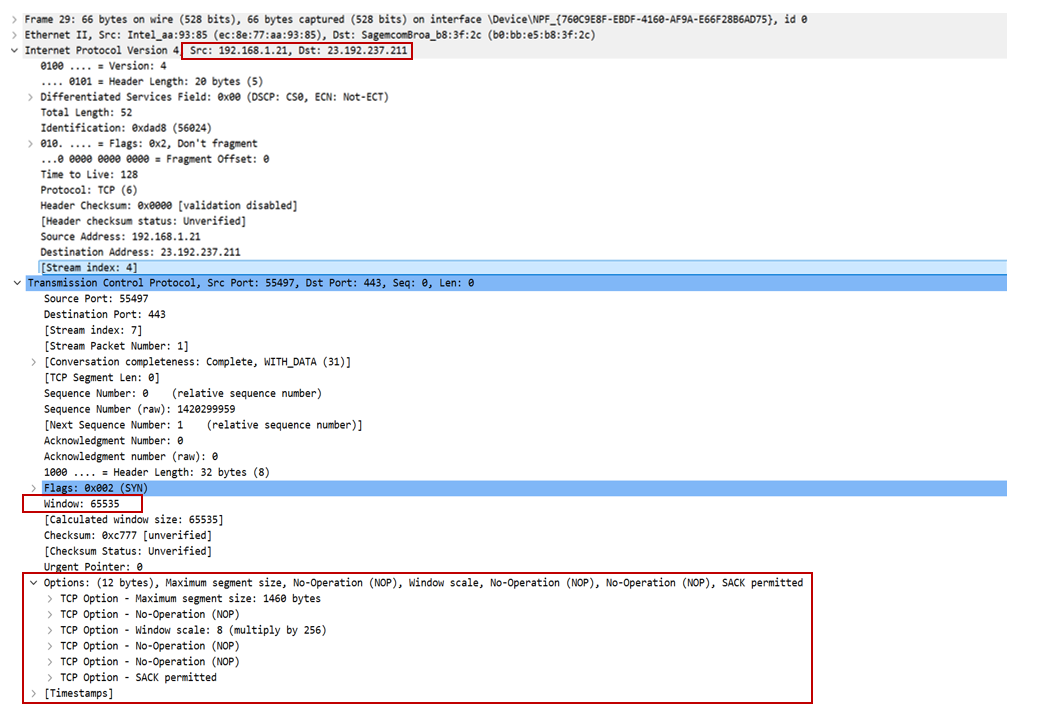
Example of a SYN packet sent by the client, containing its IP address as well as options that characterize it.
The aggregation of this information makes it possible to identify the client’s operating system or device, as well as the possible use of intermediate proxies, VPNs, etc
Setting up the security protocol
The TLS (Transport Layer Security) protocol ensures the confidentiality and integrity of data exchanged over the network. In the case of a TCP/IP-based protocol, the TCP handshake is followed by a TLS handshake, which secures the communication. The client sends an initial unencrypted “Client Hello” request informing the server of the latest TLS version it supports (between TLSv1.2 and TLSv1.3), as well as the encryption algorithms it can use (i.e., the set of algorithms that both client and server can rely on to establish a secure connection: key exchange, data encryption, etc.). Subsequent messages are used in particular to exchange encryption keys before any data is transmitted between the two machines. Depending on the version of the security protocol (TLSv1.2 or TLSv1.3), the number of messages exchanged in plaintext varies.
Since the client’s first request to the server for establishing the encryption protocol is not encrypted, it can therefore be used to determine, for a given client:
- the supported encryption algorithms (ciphers) and their number,
- the values of other “Extension” fields and their number.
The aggregation of this information makes it possible to characterise the TLS library specific to the application used for the connection. Thus, programs written in Python are very likely to share the same TLS fingerprint, and specific software such as VPN clients or a Windows-based client will each have a distinct TLS profile.
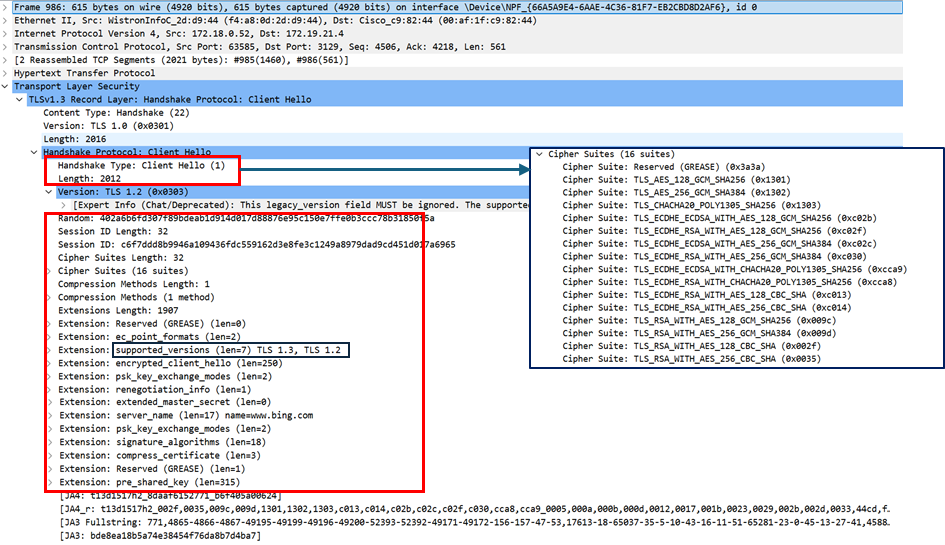
Example of a ‘Client Hello’ message during a TLS v1.3 handshake
QUIC handshake
As explained previously, the HTTP/3 protocol replaces TCP as the transport layer with the QUIC/UDP protocol. One of the key differences is the replacement of a two-handshake process (TCP followed by TLS, to establish the connection and its encryption) with a single handshake process. This combines client identification and connection encryption. Thus, whereas the TCP handshake and the beginning of the TLS handshake are transmitted in clear text, encryption is introduced earlier when using the QUIC/UDP protocol, making it more difficult to extract information. However, as before, the first message sent by the client to the server is still transmitted in clear text. As a result, information gathering remains similar to that described above for TCP/IP protocols.
Information obtained in HTTP headers
Once the client and server have been identified and the connection established between them, they begin exchanging data contained in the application layer of the request. In the case of the web, the protocol used is HTTP. Each Protocol Data Unit (PDU) in the request is accompanied by a header that can reveal information about the client (see an example below).
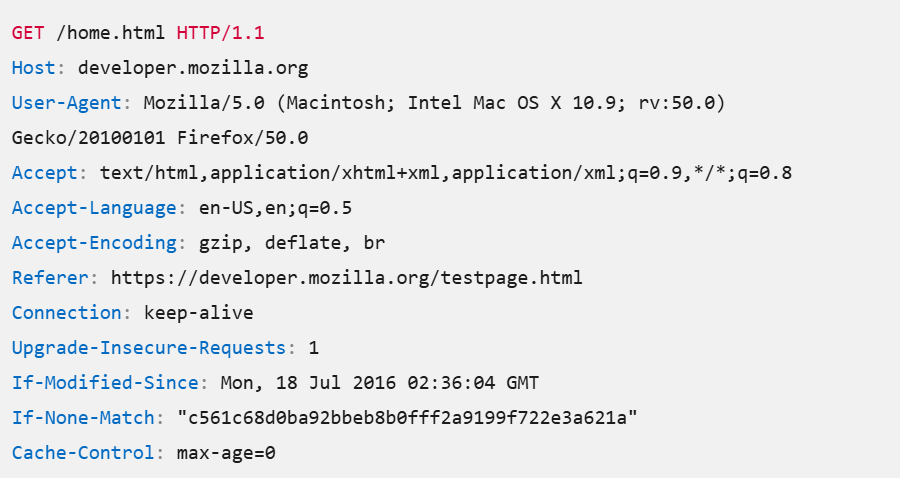
Example of information contained in the application layer of the HTTP/1.1 protocol
These header fields can be analysed to detect bots:
- User-Agent: this parameter identifies the application, browser, or more generally the tool used to interact with the server. It can, on its own, be used to identify a bot whose name may appear in the value of this field;
- Accept, Accept-Language, Accept-Encoding: these fields indicate the file types, languages, and encodings that the client can process;
- Connection: this parameter specifies whether the connection to the website’s servers should be kept open after the request has been processed. The value “keep-alive” indicates that it should;
- If-Modified-Since: this header can provide information about the client’s time zone and therefore its location;
- etc.
A bot can be detected through the absence of fields typically provided by browsers (for example, a missing “Accept-Language” header may be characteristic of a bot), through abnormal values, or by identifying the bot’s name in the “User-Agent” field. Some companies that use data extraction bots make the value of this field public in order to allow easy blocking, in a manner similar to how the “User-agent” field is specified in « robots.txt » files..
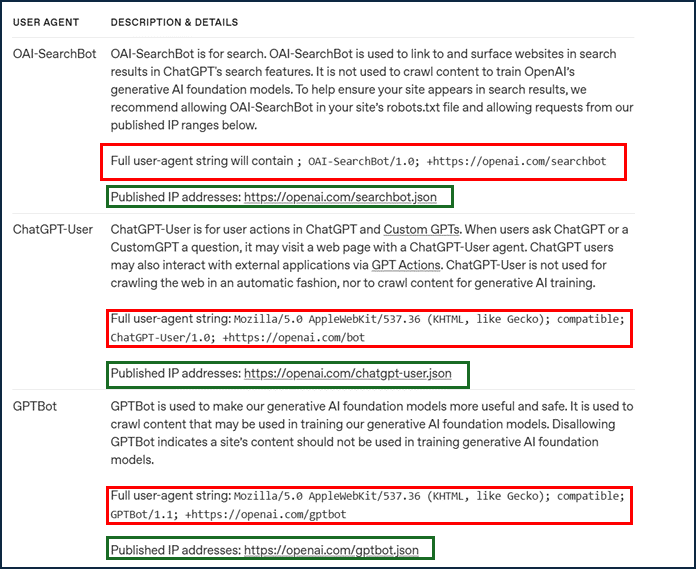
Example of the ‘User-Agent’ fields of OpenAI scraping bots. The company also provides a list of their IP addresses. It is therefore possible to filter these bots by analyzing the HTTP request headers and the client’s IP address.
Identifying the browser through client-side execution
It is also possible, once the connection has been established and the server has sent the source code of the web page the client wishes to access, to obtain information about the client’s browser. The page’s JavaScript code can be used to collect the following information:
- operating system and browser versions of the client,
- screen size,
- time zone,
- installed fonts,
- graphics rendering technology (“WebGL”) used,
- installed plugins or extensions,
- etc.
This more intrusive collection of client information makes it possible to identify the user in an almost unique way. The absence of installed plugins, simplified graphics rendering technologies, or missing fields may raise suspicion that the user is a bot. The FingerprintJS library, for example, provides a tool that can be used to assess, based on its criteria, whether a user visiting a website is likely to be a bot.
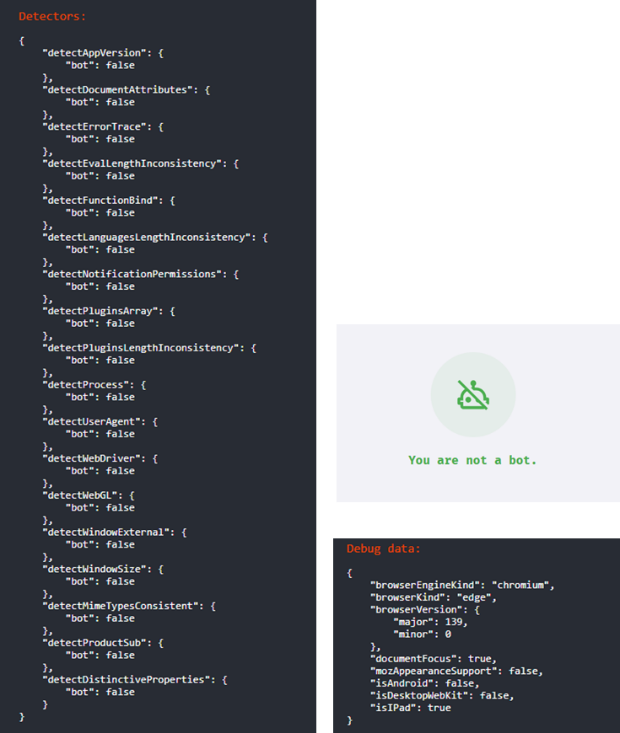
Example of information collected by the FingerprintJS library to detect a potential bot
Accessibility of information
Information extracted from the analysis of TCP and TLS headers during the establishment of the connection between the client and the server can be collected before the first exchange of application data. This makes it possible, for example, to identify and block a bot very early in the communication process. Moreover, since these headers are exchanged in clear text, their analysis does not need to be performed on the website’s server: it can also be handled by third-party services such as content delivery networks (CDNs) or cloud-based web application firewalls, which help monitor, filter, and regulate website traffic.
In contrast, examining HTTP headers and browser-related information requires the ability to decrypt request content and must therefore be performed on the server hosting the website.
Using this information: fingerprints
In order to leverage the information that can be extracted during the establishment of a connection between a client and a server by examining HTTP request headers and browser properties it is useful to adopt a systematic approach. One way to do so is to use libraries that compute fingerprints.
A fingerprint is an encoded string that summarizes a characteristic set of parameters observed during a network communication. It makes it possible to identify the machine originating a request and to infer certain information about its technical attributes.
Implementation of TCP, TLS and HTTP fingerprinting libraries
The JA4+ library is an open-source library that provides several methods for determining a client’s TCP, TLS, and HTTP fingerprints. At each layer, the collected data is sorted, concatenated, hashed, and then truncated in order to obtain a fingerprint of identical size for all clients.
Information obtained at a given layer can be enriched with data from other layers. Thus, the TLS fingerprint, in addition to information about the encryption protocol version, the number of cipher suites, and the client’s extensions, is supplemented by the following fields:
- SNI (Server Name Indication): the hostname the client is attempting to connect to,
- ALPN (Application-Layer Protocol Negotiation): the application-layer protocol used for communication (in practice, a version of the HTTP protocol),
- whether the transport protocol is TCP or QUIC.
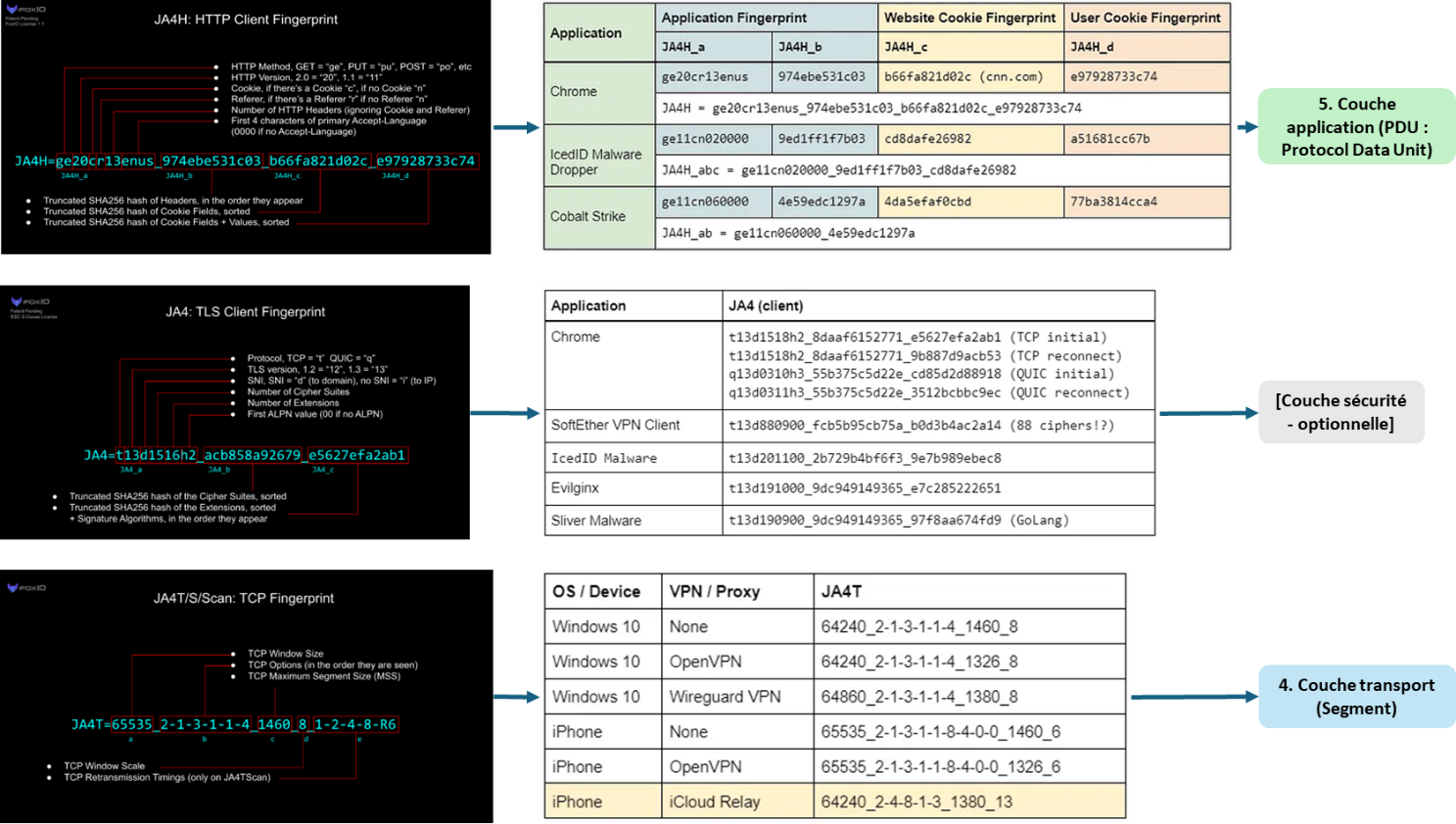
Description of JA4+ library fingerprints and examples of corresponding clients
These fingerprints are used as follows: once a client’s fingerprint has been determined at a given layer, it is compared with known fingerprints. If it matches those considered authorized to access the website, the connection is allowed. Otherwise, the IP address is blocked. For this purpose, the JA4+ library provides a database which, for each type of client (characterized by the application used, the TLS library, the type of device, the operating system, the “User-Agent” string, and the certificate authority used), supplies the fingerprints made available by its library.
Fingerprint analysis can, for example, detect the use of a VPN or a programming-language-based TLS library used for scraping (Python, JavaScript). This information provides clues that the connecting client may be a bot. It is also useful to compare fingerprints with one another in order to check consistency across layers. Indeed, some fingerprints provide similar information about the client, and identifying inconsistencies between them can be an indication of a bot that has attempted to simulate human user behavior. An example of the library’s presentation is provided in the LINC article Prevent web scraping by blocking access to the website, along with a more detailed examination of fingerprints that can reveal the use of a VPN, and therefore potentially a bot.
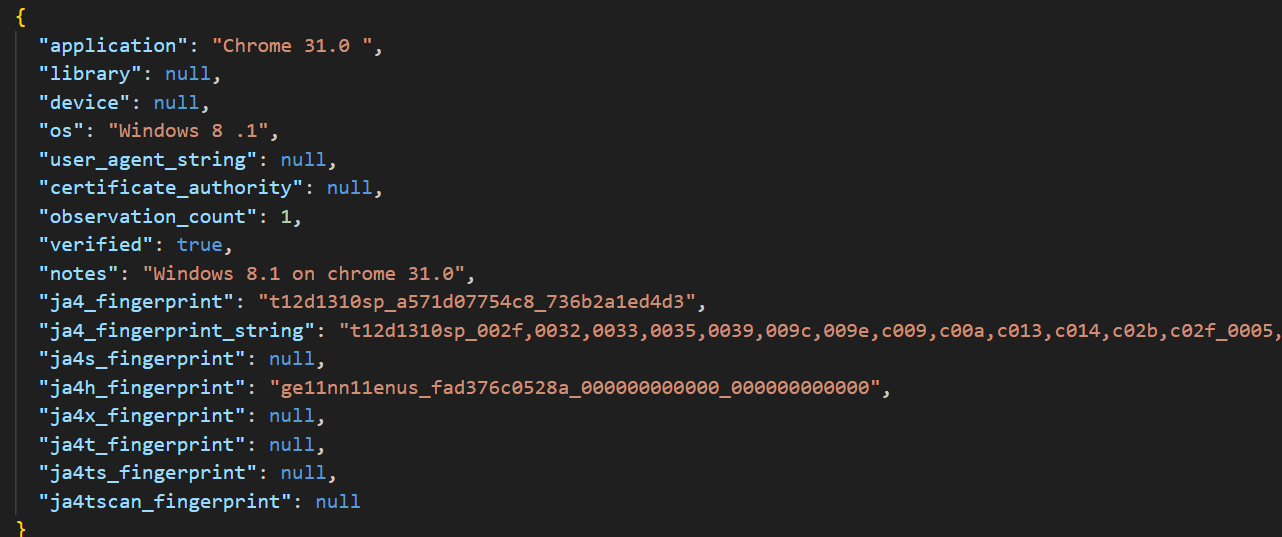
Example of a database entry for the Chrome browser, version 31.0
Implementation of browser fingerprinting libraries
Regarding the implementation of browser fingerprints, there is the FingerprintJS library. It provides a specific module dedicated to bot detection based on browser fingerprinting.
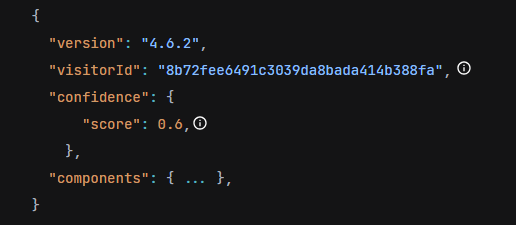
Example of client identification (the ‘visitorId’ field computed using the FingerprintJS library, along with a confidence score).
Conclusion
Fingerprinting therefore constitutes an effective way of identifying the client attempting to connect to a server. Although no method is entirely foolproof, analyzing and comparing fingerprints from the different layers of the HTTP protocol - both against known and trusted fingerprints and across layers to check for consistency - helps to minimize unauthorized access to a website.
Illustration : Nano Banana 2